There is a particular kind of friction that accumulates slowly in remote work, the kind that never quite makes it onto a retrospective board because it feels too small to name. You don’t lose a deal over it. No incident report gets filed. But it shows up, meeting after meeting, in the tiny hesitations, the apologetic messages, the “can you just share your screen instead?” workarounds that everyone accepts as normal without ever questioning whether they should.
For us, it showed up in three specific ways. And for a long time, we just lived with them.
The first problem: asking people to jump through hoops just to watch you present
Picture a common scenario. You are running a presentation or an interview with someone from outside your organization: a partner, a candidate, a client. You send them a link. They click it. And then the negotiation begins.
Do you have a Zoom account? They do not. Can you install the app? They would rather not. What about Google Meet? They do not have a Google account, or they have one but it is a personal Gmail and they are on a work laptop where they are not signed in, and now they are searching for the password to an account they haven’t used in two years, and the meeting was supposed to start four minutes ago.
We have all been in this situation, on both sides of it. It is not catastrophic. But it is exhausting, and it creates a subtle but real friction right at the moment when you want the other person to be calm, engaged, and focused on what you have to say, not wrestling with authentication flows.
The assumption baked into most video and presentation tools is that everyone has an account somewhere, and that installing software is a reasonable ask. In practice, the moment you step outside your organization’s ecosystem, this assumption starts to crack. Not everyone is willing to create an account just to sit in on a thirty-minute call. And frankly, they shouldn’t have to.
The second problem: the screen awareness you carry into every call
This one is less of a blocker and more of a habit you don’t notice you’ve developed.
When you share your screen during a presentation, you become slightly more conscious of what’s open, what might pop up, what’s sitting in the background. It’s not dramatic. Most people figure out their own routine: close a few tabs beforehand, arrange windows, keep things tidy. It becomes second nature after a while.
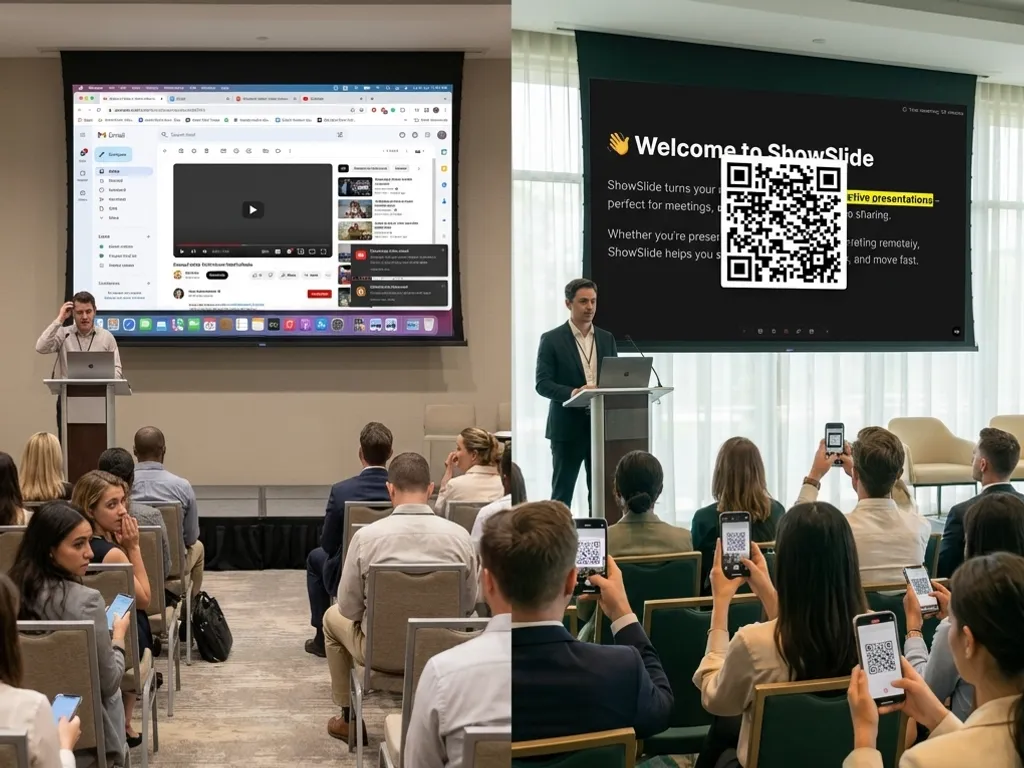
But it is still overhead. A small part of your attention that isn’t on the presentation itself. The awareness that your screen, which normally belongs entirely to you, is being broadcast to people on the other end of the call: your notes, your emails, other browser tabs, internal documents you didn’t intend to share. You learn to manage it, but the management is still there.
The third problem: the time you spend building slides instead of building the talk
This is the one that I think costs the most, and it gets normalized the fastest.
You have something to say. You know your content. But before you can present it, you need to produce a deck: pick a template, arrange the elements, get the fonts to cooperate, move things around until the layout doesn’t embarrass you. None of this work is the actual work. It is the scaffolding around the work, and it can easily eat more time than the preparation of the content itself.
The irony is that the quality of the scaffolding has almost nothing to do with the quality of the presentation. A beautifully formatted slide full of weak thinking will underperform a plain slide with a clear argument every single time. But the tooling pushes you toward the scaffolding, because that is what is in front of you. You open PowerPoint or Google Slides and the first question it asks you is not “what do you want to say?” but “which template do you want?”
What we built, and why it ended up being something else entirely
ShowSlide started as an internal tool. We needed a way to run presentations cleanly, without ceremony: the kind of tool that just works, for anyone on the other end, regardless of what device they’re holding or what accounts they have.
The core idea was simple: the presenter controls what the audience sees, and nothing else travels across. You open your slides, you start the session, and anyone with a link, on a phone, a tablet, a laptop, a desktop, whatever they happen to be sitting in front of, can follow along in real time. No installation. No account. No friction. Just a URL and a browser.
Because ShowSlide is not screen sharing, you are not broadcasting your screen. You are sharing your slides, which means everything else on your screen stays exactly where it is. Your notes are open in another window. Your private documents are there. Your email client is running. None of it goes anywhere. You can have your preparation materials open, your speaker notes front and center, your private context available at a glance, and the audience sees exactly what you’ve decided they should see. Nothing more, nothing less. It is a small shift in how the tool works, but it removes the screen awareness entirely: there is simply nothing to manage.
On the third problem, this is where ShowSlide does something that took us by surprise. It generates your slides automatically from your content. You focus on what you want to say, and the tool handles the arrangement and design. No template-wrestling, no layout adjustments, no time lost deciding whether the heading should be centered or left-aligned. The output is clean and professional, and the time you used to spend on scaffolding goes back to the actual preparation.
Three problems, one tool
These are not exotic problems. They affect anyone who regularly presents to people outside their organization: consultants, recruiters, founders running demos, trainers, educators, anyone sitting at the intersection of “I need to show people things” and “those people are not my colleagues.”
ShowSlide has been running inside our workflows for a while now. We use it for interviews, for client presentations, for internal demos where we’re pulling in collaborators from outside the team. It became one of those tools that quietly becomes load-bearing: you don’t notice it anymore, because it just works, and the problems it was solving have simply stopped being problems.
Now it is available for everyone. If you recognize any of the three scenarios described here, it is worth trying. The experience is different from what you’re probably used to, and in the best way: it asks almost nothing of your audience, removes the overhead from your own side of the screen, and lets you spend your preparation time on the thing that actually matters, which is what you are going to say.
You can try it at showslide.com.
Keep reading




CTO @ Wingravity and Co-Founder of Slashscore. Passionate about building tools that empower developers and teams. Have a question or want to collaborate? Reach out via our contact form.